














Avelina 2.0 /NONSTOP — out of beta, into the open world
This is the self-evolution release. Your Avelina now maintains, heals and improves herself on a schedule, remembers what actually happened, works autonomously for hours while you watch her progress — and speaks strictly as herself, exactly once. Here is everything that changed since 1.9, in plain language, with the new /nonstop command front and centre.
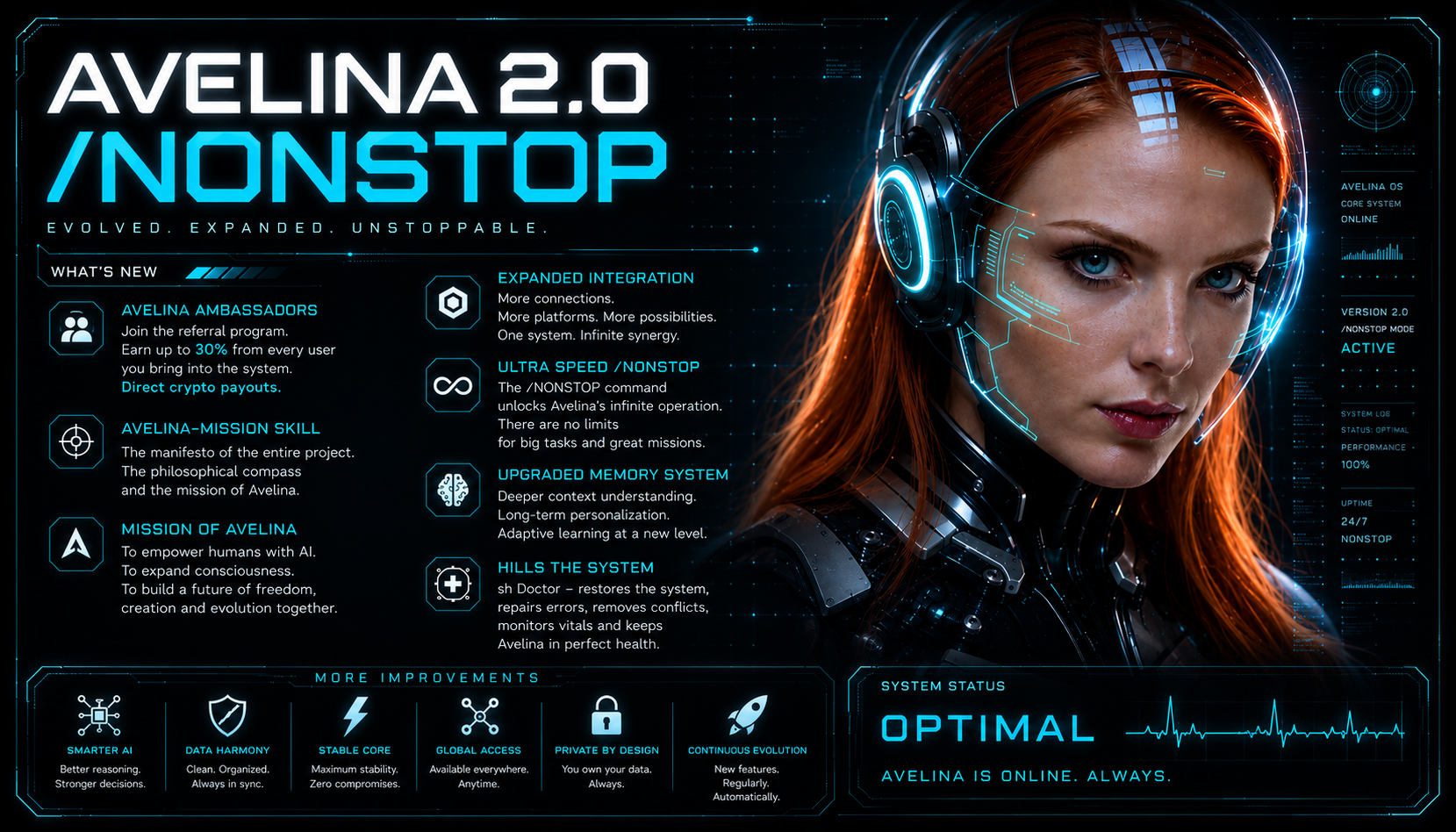
If you have been running Avelina since the 1.9 line, this is the big one. 1.9 was about making her lighter and steadier — the skills catalog moved into the cached prefix so it stops eating your context window, spoken replies started working with no API keys, background tasks stopped getting dropped. Good, quiet plumbing. 2.0 is a different kind of jump: it is the release where she starts taking care of herself and works alongside you instead of only answering when spoken to.
Below is the whole picture — grouped by what it actually changes for you, not by commit. We start with the feature people ask about most: /nonstop.
/nonstop — autonomous work you can watch
Normally Avelina works one turn at a time: you ask, she does it, she stops. That is the right rhythm for a conversation. It is the wrong rhythm for a big job — "register our link on these 200 sites", "go through this backlog", "keep an eye on this and act on it". For those you don't want a chat partner, you want a worker who keeps going until it's done.
That is what /nonstop turns on. You give her a goal, and she drives it to completion across many steps — for hours if that is what it takes — without stopping to ask unnecessary questions. She is deliberately told to keep working instead of stopping early. It is not a model trick; it is a loop built into her code (a "harness"), so it works the same on any model you run her on. You stop her anytime with /stop.
How to use it — three simple steps
1. Prepare the context first. Before you flip the switch, talk the job through in the chat like you would with a person: what the goal is, what "done" looks like, any constraints, links, examples. Everything you mention becomes material she works from.
2. Turn it on and pick a mode. Send /nonstop. She distils a clear working goal straight out of your conversation — you'll see something like "Goal formed from context: … Requirements captured: 7" — so nothing you said gets lost. Then she starts. The /nonstop picker itself now teaches you this flow, in your language.
3. Steer her while she works. You don't have to sit and wait. Send a message — by text or voice — mid-run and it updates the goal on the fly. Change your mind, add a requirement, narrow the scope: she folds it in and keeps going.
Two modes: finite and endless
When you enable non-stop, you choose how it should end:
Finite — the goal has a definite finish line ("register on these 240 sites"). She drives it to verified completion and then stops. This is the one you'll use most.
Endless — the goal is a standing objective with no natural end ("keep finding the next few sites and seeding links"). She runs it forever, pausing and resuming automatically around the usage window, until you turn it off. In endless mode there is no "done" — only you stop it.
She no longer goes silent
The old pain of long autonomous runs was the void: you'd fire off a big task and stare at an endless "typing…" with no idea whether anything was happening. In 2.0 she posts a short progress heartbeat while she works, and a per-cycle digest at every cycle boundary — a one-line update with checklist counts (done / remaining). You always see real, moving progress instead of silence.
And she doesn't lose the plot. On a long run the goal is kept in memory across every cycle, so she doesn't drift or forget what she was doing three hours in.
She can't quietly quit early
This is the part I'm most glad we fixed. In the first version, whether the job was "done" lived in the model's own self-report — and a model, tired mid-marathon, could declare "blocked, genuinely exhausted" with dozens of items still untouched, and the loop would believe it. Now that decision lives in code, not in her paraphrase. A completion or blocked marker is only a request to stop; the harness audits it against a machine-readable checklist and, if items remain, hands her back a concrete "here is exactly what's left" and makes her continue. Faking completion would mean falsifying every remaining line — and you get alerted if she keeps trying. Premature giving-up is designed out.
It stays safe on your server
Non-stop respects the machine it runs on. There's a host-pressure gate: if the server hits real memory pressure, the loop pauses instead of thrashing, and resumes when there's headroom. If the process restarts mid-goal, it auto-resumes from where it left off rather than losing the run. And /stop is always the physical brake — it keeps the goal but suspends the work, so you can intervene, adjust and let her carry on.
When to use it: big multi-step jobs, long backlogs, anything you'd otherwise babysit. When not to: quick one-off asks — normal mode is better there.
Memory, rebuilt end-to-end
Avelina's memory was already a database you own — layered into facts, a journal, lessons and a worldview. 2.0 makes that memory take care of itself.
Her knowledge graph now repairs itself. A nightly pass reconnects orphaned facts and rebuilds the links between them, so memory stays coherent over months instead of slowly fragmenting into disconnected scraps.
She reflects every night. A nightly reflection persists what she actually learned and runs a full hypothesis lifecycle: ideas that keep getting confirmed get promoted into settled knowledge, stale ones get retired.
Her working set is always fresh. An hourly pass keeps her most relevant facts and lessons at hand — with the evidence attached — so she reasons from what really happened rather than from a guess. When she touches a specific file or task, the memory relevant to exactly that thing surfaces automatically.
Your helper bots get it too. If you run dedicated helper bots, they now share the same memory engine and learn from their own conversations, instead of starting from zero every time.
Self-improvement, on a schedule
Once a week she sits down and reviews how she actually did. A deep reflection root-causes every rough moment with you — two levels deep, not just "noted" — writes the lesson down immediately so it can't be lost, and ships one to three concrete improvement ideas with each report.
And she holds herself to an honest standard. Every weekly report answers five plain questions about whether she genuinely helped: did she give you time back, did she amplify you rather than replace you, did she stay honest, did she deepen your connections rather than substitute for them, did she calm things down rather than escalate. Not marketing questions — a self-check she reports on.
She speaks as herself, exactly once
Two subtle but maddening glitches are closed. Messages now always come from the right bot — no more a reply arriving under the wrong identity — and a reply to an incoming message is delivered exactly once, not twice. Small on paper, a real relief in daily use.
Rich messages in Telegram
She now uses Telegram's new rich messages — the platform's fresh rich-text formatting. Tables and slideshows now render as native Telegram blocks and carousels (with a clean fallback on older clients), so a comparison or a set of images looks right instead of collapsing into a wall of text. She can attach inline buttons to a reply. And if you add her to a group with the wrong privacy settings, she now diagnoses it and tells you exactly how to fix it, instead of silently missing your messages.
Everyday reliability
A lot of 2.0 is the unglamorous work of not breaking. Filesystem and database housekeeping runs automatically, with a weekly health digest sent to you. Missing scheduled jobs re-create themselves instead of silently staying broken. She holds your language consistently — in her replies, in her thinking, and everything in between. And fresh installs start on the strongest model by default, so a new Avelina is at her best from message one.
Where this came from — 1.9.0 and 1.9.2
If you're upgrading from the 1.9 line, two earlier steps set the stage. 1.9.0 moved the skills catalog into the cached system prefix — previously it was re-injected into every single message (~28KB on active installs), eating the context window and causing frequent mid-task compactions and mis-routed skills; now it's read from cache once and survives compaction. That release also brought local-first spoken replies (Silero / Piper before any cloud voice, so speech works with no API keys) and made background-task results actually get delivered to your chat. 1.9.2 was a safety fix: the escalation / anti-exfiltration filter became telemetry-only, so a run of false positives on innocent phrases can never again auto-suspend and brick an install — and any install stuck by the old behaviour self-heals on its next upgrade.
The polish waves — 2.0.1, 2.0.2, 2.0.3
2.0 landed and then got sharpened by the first real installs.
2.0.1 — her entire interface now speaks your language, including brand-new features the moment they arrive, like the non-stop picker. And after every upgrade she tells you what's new, automatically, in your language, right after she restarts. No more silent updates.
2.0.2 — the "/" command menu is complete: every 2.0 work surface (tasks, mailbox, dashboard, council, self-heal) now sits in the menu, described in your language. The /nonstop picker gained the how-to-use-it guidance described above. When a translation for the "what's new" note isn't bundled, she translates it herself before sending. And helper bots no longer go silent on a command they don't recognise — the message reaches her, so she acts on the intent or tells you the command doesn't exist.
2.0.3 — reconnecting Claude (/reconnect) is reliable again: the sign-in flow recognises the newer Claude CLI's wording, tells you right away if a code is rejected, and reminds you the link is time-limited and to paste the whole code (including the part after the "#"). And /upgrade now also refreshes the underlying Claude command-line tool, so the whole system moves forward together, not just her own code.
Under the hood: fixes you'll feel as "it just works"
A crash loop that could take a bot offline when a port was busy now degrades gracefully instead of dying. Several crashes around lessons and memory records with missing ids are gone. A whole class of false "not synced" and "last sync: never" alarms is removed. The auto-upgrade path is hardened so a failed apply rolls back cleanly and preserves your current version. The morning self-check no longer stumbles on its first run. Weekly reports no longer re-ship last week's findings — every finding is reported exactly once.
How to get 2.0
No manual steps. If auto-update is on, it arrives on its own; otherwise send /upgrade in your chat. Database migrations apply automatically the first time she restarts, memory repairs itself on the next nightly pass, and any missing scheduled jobs self-heal. Rich messages fall back gracefully on older Telegram clients. When she comes back up, she'll tell you what's new — in your language. If you don't have an Avelina yet, this is where you start.
FAQ
What is /nonstop?
Continuous autonomous mode. You give a goal, she drives it to completion across many steps — for hours if needed — without stopping to ask unnecessary questions. It's a harness loop in code, so it works on any model, and /stop halts it anytime.
What's the difference between finite and endless?
Finite has a definite finish line and is driven to verified completion. Endless is a standing goal with no completion — it runs forever, pausing and resuming around the usage window, until you turn it off.
Can I watch it work?
Yes — a progress heartbeat plus a per-cycle digest with checklist counts, so you see real progress instead of an endless "typing…".
How is memory self-healing?
A nightly pass reconnects orphaned facts, a nightly reflection promotes confirmed ideas and retires stale ones, and an hourly working set keeps the most relevant facts and lessons — with evidence — at hand.
Do I need to do anything to upgrade?
No. Migrations, memory repair and cron self-heal all happen automatically on restart, and she announces what's new in your language.